gulp
a goldfish in your menu bar

Scribble.
Forget. Repeat.

Gulp is a scratchpad that forgets. Press ⌃⌥G from anywhere, type the thing you’ll need in a bit, and hit return — or press ⌃⌥V and just say it. The fish holds it for four hours, then lets it go. No archive, no guilt.

Download for Mac Version 1.0 · macOS 26.5 or later
Everything stays on your Mac
the tour · 30 seconds

Feed it. Find it. Let it go.

Best with the sound on.
how it works

A shortcut, and you’re back to work.

  1. 1

    Press ⌃⌥G, anywhere.

    A paper strip opens in the middle of your screen with the cursor already in it — or press ⌃⌥V to talk instead. It doesn’t pull you out of the app you were in.

  2. 2

    Type it. Hit return.

    “check the deploy at 4”, “the word ineffable, for the email”. The strip lets go in a drift of gold dust and the fish gulps. ⌘↩ feeds it and keeps the strip open for the next one.

  3. 3

    It’s there when you need it.

    Click the fish, or press ⌃⌥B from anywhere. ↑ and ↓ pick a note, ⌘C copies it, esc puts the bowl away. Hours later it’s gone, and so is the pressure to file it.

say it

Hands full? Just say it.

Press ⌃⌥V, or Tab in the strip, and talk. Settled words land in ink and the ones still arriving stay pale. Return feeds the fish.

  • Heard on your Mac, only.Apple’s on-device transcription turns speech into text. The audio is never saved and never sent anywhere.
  • Type or speak. Tab to switch.The strip changes in place, and anything you said carries over if you’d rather tidy it up by hand.
  • ⌘↩ keeps going.Feed one thought and the strip stays open, still listening, for the next. Esc when you’re done.
while your agents work

Juggling three tasks? Let the fish hold the rest.

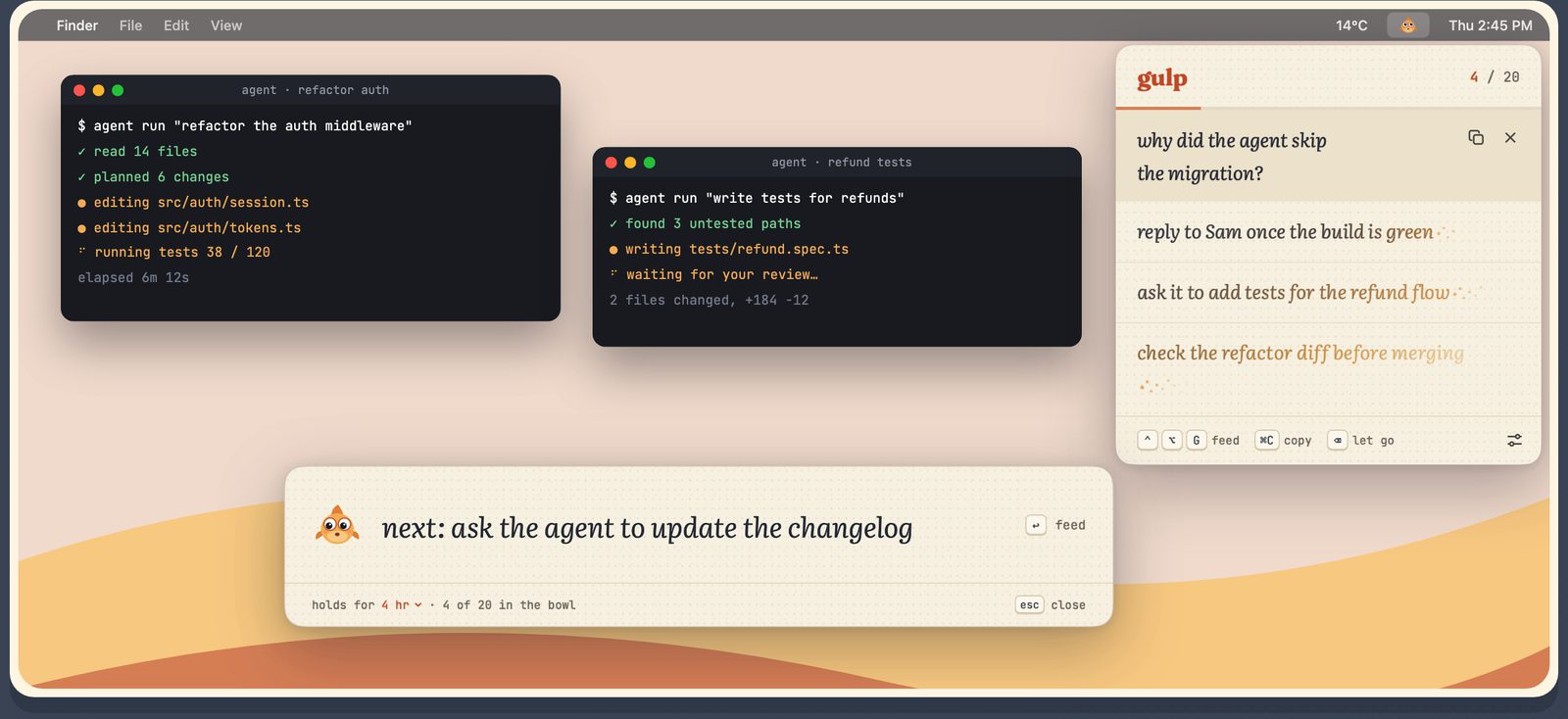
One agent is refactoring, another wants a review, and a follow-up just came to you. Park it in the bowl without leaving the terminal, and pick it up when the run finishes.
  • ⌘↩ feeds a follow-up and keeps the strip open for the next
  • Drag a note out of the bowl, straight into a prompt, a terminal or a message
  • Right-click › Services › Feed the Fish on any selected text, in any app
A Mac desktop with two agent terminals running, a refactor and a set of refund tests waiting for review. The capture strip holds the follow-up “next: ask the agent to update the changelog”, and the bowl under the menu bar fish holds earlier follow-ups at different ages.
the fade

Watch a thought turn to gold, then dust.

Notes don’t blink out. The ink takes on your theme’s colour from the end of the line back, dust gathers after the last word, and at the end the whole thing sinks and dissolves. By the time it’s gone you’ve already made peace with it.

check the staging deploy at 4
the fish

Alive enough. Quiet enough.

The fish is the whole interface. Its face tells you what’s in the bowl without you opening anything, and it never pings, badges or bounces.

awake

Holding thoughts. It blinks now and then and its eyes follow your pointer. Try it. In the menu bar it holds perfectly still.

dozing

The bowl is empty. Eyes shut, perfectly still. An empty bowl costs your battery nothing.

gulp!

You just fed it. A quick squash and a swallow as the note lands, with a soft pop if you like sounds.

worried

A note is in its final minute. A small wiggle you’ll catch from the corner of your eye, then a confused head-shake when it’s gone.

Blinking and cursor-following can each be switched off in Settings.

settings

Set it once. Then forget it too.

Everything the app asks of you lives on one page. After that it asks nothing: no confirmations, no per-note options.

  • Memory15 minutes, 30 minutes, 1 hour, 4 hours or a day. Also changeable from the capture strip.
  • Bowl size10, 20, 30 or 50 thoughts. When it’s full, the oldest one swims off.
  • ShortcutsOne to type, one to talk, one to open the bowl. Pick your own, in Settings or the welcome tour.
  • LookFour themes, three text sizes, and whether the bowl hangs from the fish or opens mid-screen.
gulpa goldfish in your menu bar
MEMORY
Memoryhow long each thought stays in the bowl
Text sizefor the capture strip and the bowl
FISH
Blinkinga slow blink every half a minute or so
Follow the cursorits eyes follow your pointer while it holds a thought
promises

What the fish won’t do, on purpose.

A note that could be saved is a note you’d feel you should save. Gulp works because saving isn’t on the table.

What it does

  • Catches a thought from anywhere, typed or said
  • Holds up to fifty at once, newest on top
  • Fades every one on the same timer
  • Lets you copy a note, drag it out, or let it go early
  • Takes text from any app’s right-click menu, or dropped on the fish
  • Keeps your bowl if you quit and reopen

What it refuses

  • A history of forgotten notes
  • Undoing a forget
  • Tags, folders or search
  • Pinning a note forever
  • Reminders, alarms or notifications
  • Sync, accounts or the cloud
  • Keeping a recording of your voice
Nothing leaves your Mac.

Gulp has no network access, no analytics and no account. Voice is transcribed on your Mac by Apple’s on-device model, and the audio is never kept. Only notes that are still alive are stored, inside the app’s sandbox, and a restart empties the bowl.

For the things you’d be sad to forget, but only for the next few hours.

Download for Mac Version 1.0 · macOS 26.5 or later
The Tug app icon
from the same maker · gulp’s cousin

tug, a menu bar timer you pull out like a tongue.

Click Tug in your menu bar, pull down, and let go. Name the timer, hit return, and it rings when time’s up. Run one or twenty at once, or let Tug run a whole Pomodoro session. Same care as Gulp, and nothing leaves your Mac either.

  • one gesture
  • pomodoro built in
  • ⌃⌥T from anywhere
  • seven palettes
  • its eyes follow your cursor too
Get Tug on the Mac App Store macOS 26 or later · Apple Silicon & Intel
contact

Something fishy? Write to the maker.

A bug, an idea, or a shortcut that clashes with another app. Gulp and Tug share one inbox, and a person reads every message.

How Gulp handles your notes and your voice: privacy policy.